The chat
The docked panel and the bottom command bar are one conversation. Covers the mode, plan and context pills, the stop and clear controls, and Ctrl or Cmd+I.
The chat is always present in the editor. It just has two placements, and they're one conversation.
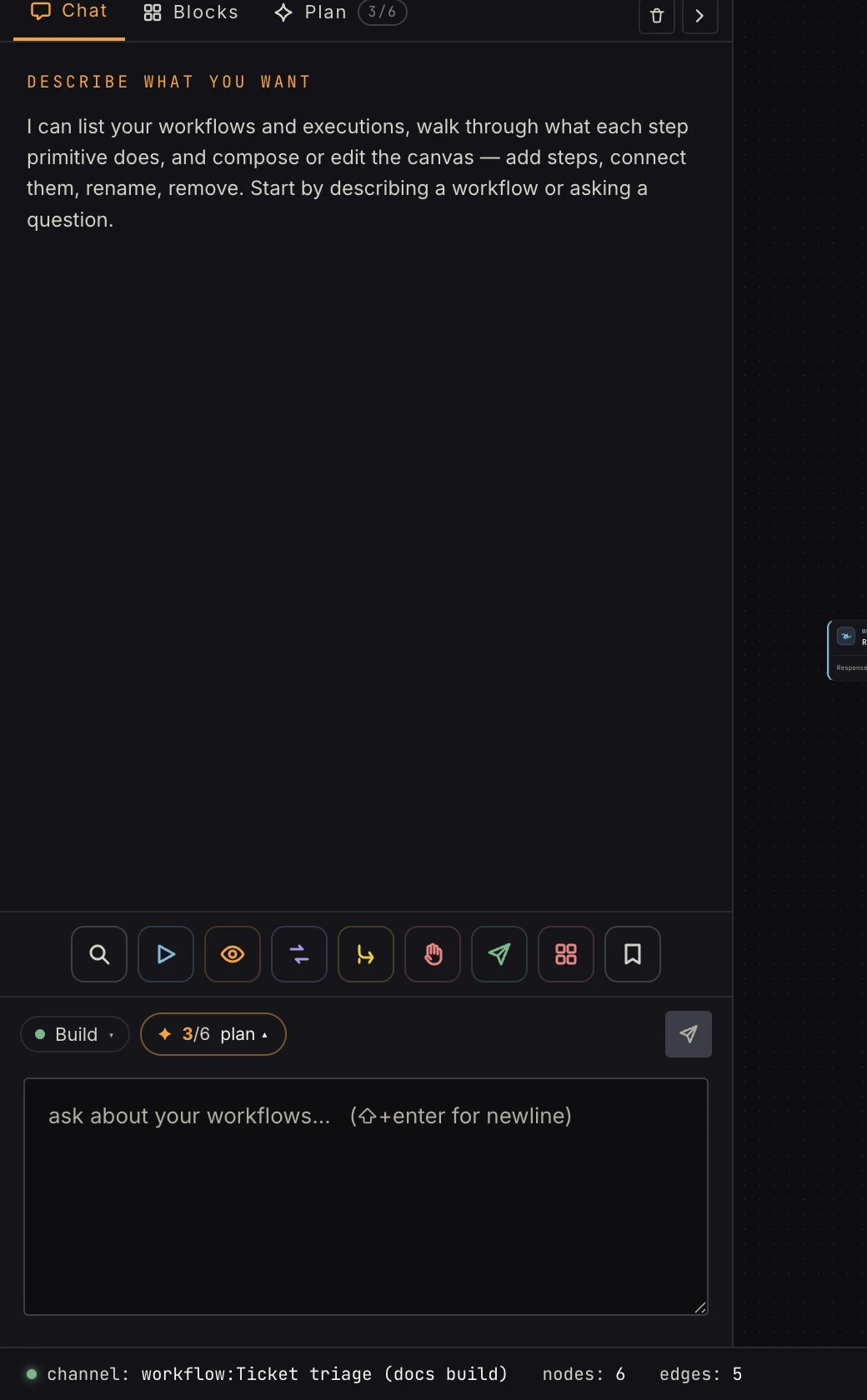 Docked: the full transcript in the left column. The pills row carries mode, plan, and context.
Dock and command bar
- Docked: the transcript fills the left column under the Chat · Blocks · Plan strip. Best while actively building. With the chat holding the column, the palette folds into a glyph toolbar in the dock's footer (search, the block groups, Apps, Saved); a glyph opens that group's steps as a popover over the transcript.
- Command bar: a slim input along the bottom; the canvas gets
the room. Best while hand-editing. Replies appear as a card above
the bar, sized to the latest message with older turns scrolling
above it; during a build the card floats in empty canvas space so
verify messages aren't missed. The
×dismisses it. Ctrl/⌘+I summons the command bar from anywhere in the editor.
The ‹ / › arrows swap placements: › in the dock header ("Move
chat to the canvas bar") sends it down, and the expand button on
the command bar brings it back up. There's no close. Collapse is as
small as it gets, because the AI is a first-class part of the
editor, not a widget. Your placement is saved to your account, so it
survives a refresh and follows you across browsers.
The pills
- Mode: a dropdown with Build and Ask (modes, Ask mode). Always your click; never auto-switched. It opens upward and Esc closes it.
- Plan: while a plan exists, the
N/Mverified counter rides here with an amber ✦; click it for the plan peek, a popover over the transcript. A small bubble counts plan progress that landed while the peek was closed. Green ✓ when the build is ready. - Context: when a step is selected, "editing step name" (with its id when the name isn't unique) scopes your next message to it. With nothing selected the pill reads "ask max about this workflow".
Composer
Enter sends; Shift+Enter inserts a newline. The input is disabled while a turn is in flight. Esc in the command bar hands focus back to the canvas; Esc in the docked composer collapses the chat to the command bar. Arriving from the workflows list with "Fix with Max" pre-fills the composer but never sends.
Turn controls
- Stop: the square button kills the in-flight turn. Whatever the model already staged stays, and the rail's Undo Max's changes restores the canvas to before the AI's last edit (build mode).
- Clear: wipes the visible transcript for a fresh view. It doesn't undo canvas changes, doesn't delete run evidence, and doesn't reset the AI's memory of the conversation: the next message continues the same session.
FAQ
Do the Blocks/Plan tabs end my conversation? No. Tabs change what's displayed. The conversation continues where you left it. Picking the Chat tab mounts the dock again.
Why did the camera move while Max worked? During builds the camera follows the current step. Grab the canvas any time; your hand always wins.
Which model answers? Always the platform model. The chat has no model picker; BYO keys apply to agent steps only (AI settings).
Why won't it send? A turn is still running (wait or press Stop), or the workspace's AI credit is spent, in which case the reply says so.