Send text
Text a phone from the platform number. Recipients verify once into the workspace phone book, which is the consent model. Templating and the 480-char cap.
Text a phone from the MadMax platform number. Recipients verify once with a 6-digit code (Settings → messaging) and join the workspace phone book; the step only ever offers verified numbers. The phone book is the consent model.
What it does
When the step runs it resolves the chosen number through the run's workspace, renders the message against the payload, checks the workspace's daily cap, and sends from the one platform number. The step is green only when the carrier accepted the message: a delivery error is a red step with the provider's reason, so error handling applies like anywhere else.
The number must belong to the same workspace the run is executing in. A number id from another workspace, or one that was never verified, is a step error rather than a send; config can't route around the phone book.
Config
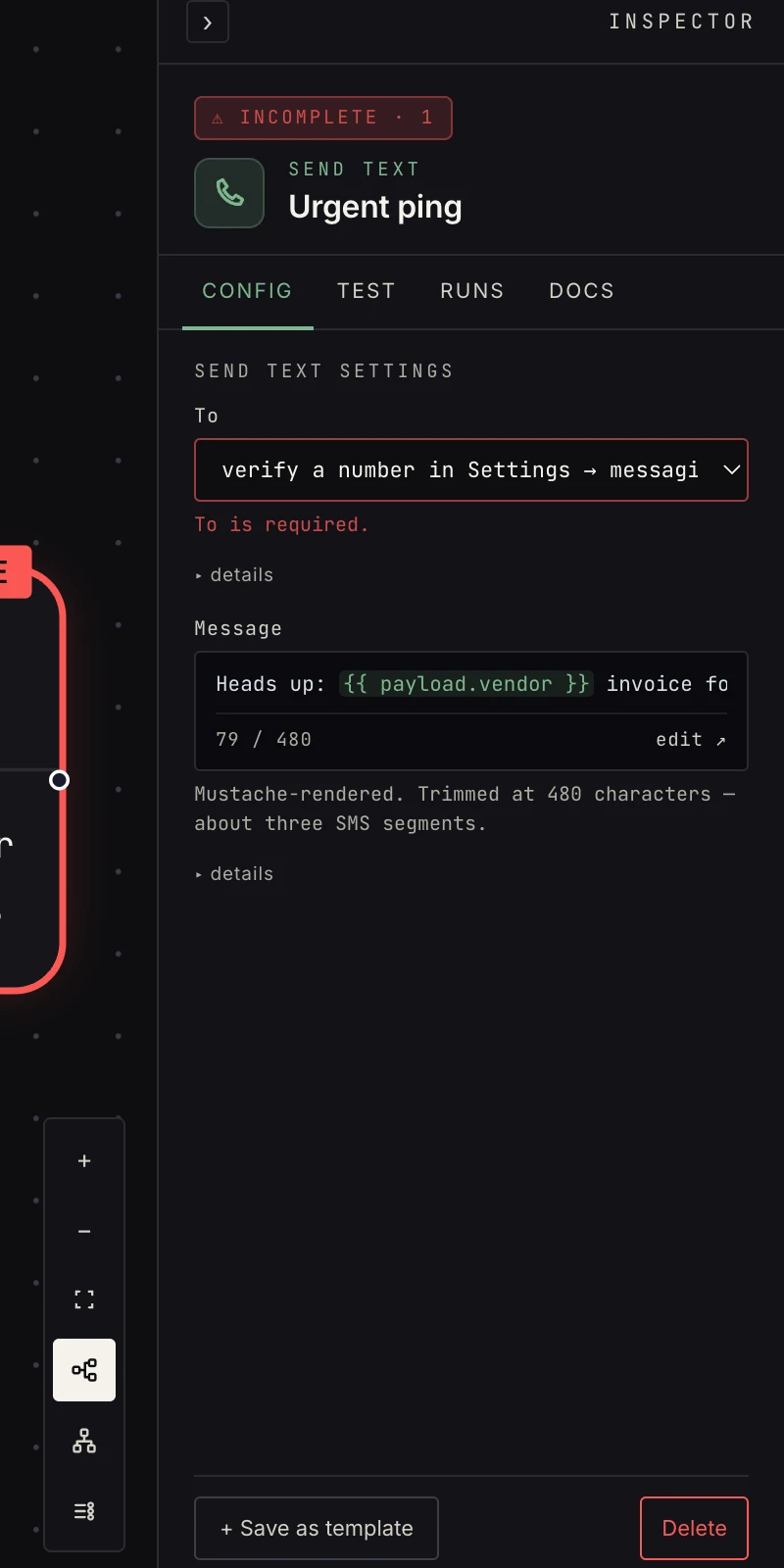 Pick a verified number, write the message.
- To: a number from the workspace phone book. Unverified numbers never appear. If the number you picked is later removed from the book, the step falls back to the workspace's only remaining verified number; with none or several, it fails with a message telling you to pick again.
- Message: template-rendered against the payload
(
{{ payload.text }},{{ steps.<id>.output.field }}), then trimmed at 480 characters, about three SMS segments. Trimming is silent; a message that renders to an empty string is an error.
Output
{ "ok": true, "id": "<message id>", "to": "+18015550142", "body": "…" }
{{ payload.to }} is the E.164 number that was texted and
{{ payload.body }} the message as sent, after templating and
trimming. When delivery fails the error payload carries ok: false,
to, and an error string.
Verification
The step's verify kind is write_preview: the verification run
renders the exact message against the real upstream sample, shows
the recipient, its label, and the sending number, and sends
nothing. See verification for how previews
fit into the walk.
Patterns
- Urgent lane: classify → urgent goes to SMS, routine to email.
- Two-way desk: pair with the
text trigger: inbound texts start
workflows, this step answers them.
{{ payload.from }}from the trigger is already a verified number, so the reply can only go to someone who opted in. - Decisions by text: for a yes/no, don't hand-roll it. The approval step can deliver its prompt over text and reads the YES or NO reply for you.
Gotchas
- Texting arbitrary numbers isn't possible by design. The recipient must verify into the workspace first.
- STOP opts a recipient out at the carrier level, always. The number is suspended everywhere it's verified until the person texts START, and sends to it fail in the meantime.
- A per-workspace daily cap applies (50 sends a day by default). Over the cap the step fails with a message saying when it resets, so keep SMS for what genuinely can't wait for email.
- The step arms only once the workspace has a verified number; until then the canvas marks it as needing setup.
Related
- Text messaging for verification, routing, and the STOP keyword.
- Text trigger, the inbound half.
- Send email for the longer, cheaper channel.