Data stores
Create a store with a slug and schema, write rows by key from workflows, browse them in Settings, mark fields sensitive, import or export, and use REST.
A store is a keyed table your workflows write and read: the durable output of extraction pipelines, the cache in front of slow APIs, the work queue for batch jobs.
Creating a store
Settings → data → stores. A store gets a name, a slug (immutable once created), and a schema. Build it field-by-field (name / type / required) or paste JSON Schema. The schema validates every write: a row that doesn't conform fails the writing step with every violation listed.
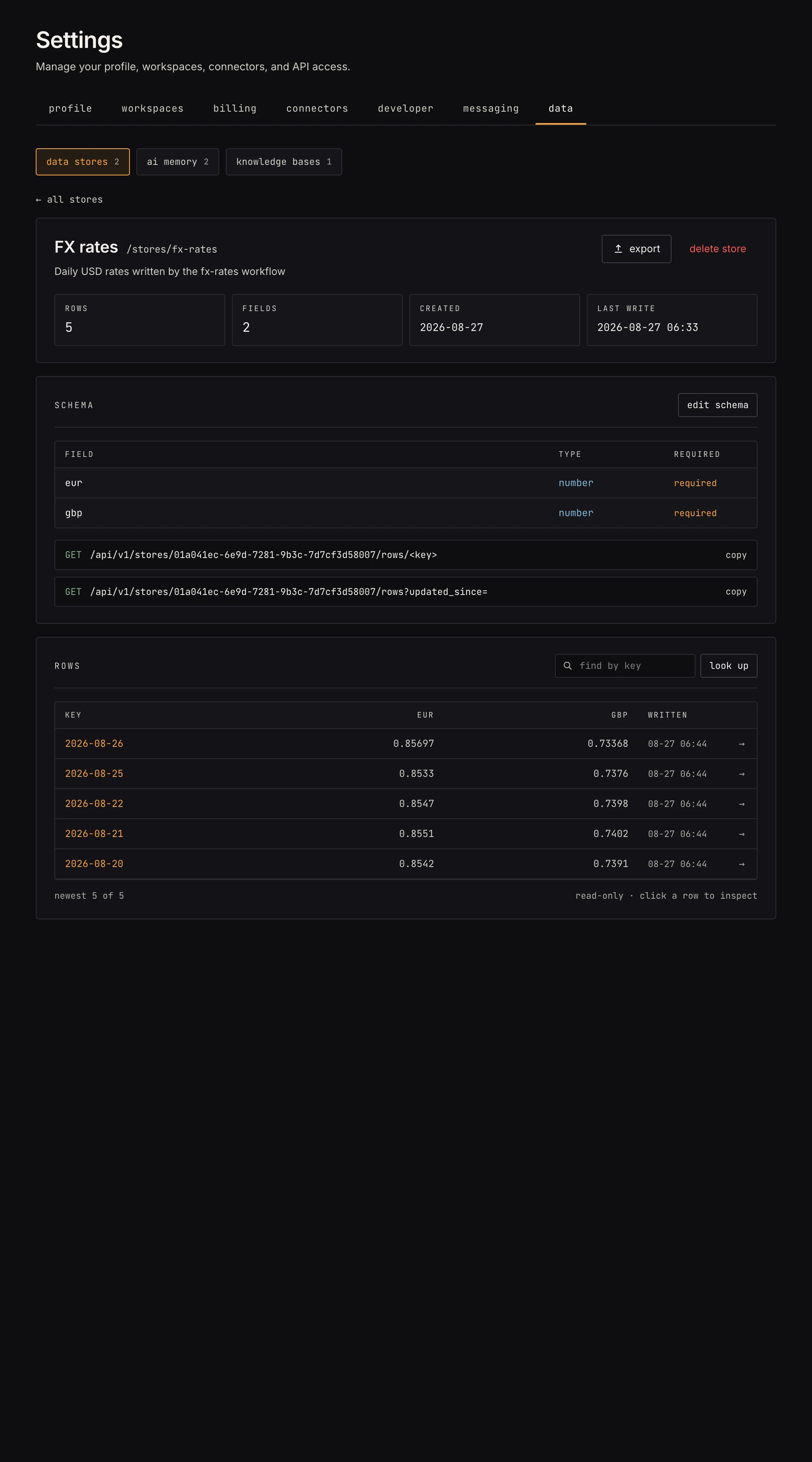 Rows newest-first with schema-derived columns, find-by-key, and the copyable API URL.
Rows
- Every row has a key you choose (an order id, an email, a FIPS code). It's unique per store, and the whole write contract: writing an existing key replaces that row.
- Rows record which run and workflow wrote them, so you get provenance for free.
- In Settings, rows are deliberately read-only: rows are workflow-written, so a hand-edited value can't paper over a pipeline bug. (Fix the workflow, re-run, the upsert overwrites.)
- Default capacity is 100,000 rows per store.
- Any workspace member can read, write and edit a store's schema; deleting a store or a row is for workspace owners and admins, the same rule as connections.
Workflows write with save to store and read with get from store, including the list-rows-missing-a-field mode that turns a store into a work queue.
Sensitive fields
Some rows carry things that shouldn't sit in plaintext: an API token per account, a signing secret, a card's last digits. Mark that field sensitive in the schema editor (the checkbox next to Required, off by default) and its value is encrypted at rest, with the same key that protects your connections:
- Workflows see the real value:
get from storereturns it, andsave to storewrites it the same way as any other field. - The REST rows endpoints return the real value too, since you're authenticated and the store is yours. So do exports.
- The row browser in Settings shows it masked (last four characters), including the record view and "copy json".
- A sensitive field can't be filtered or sorted on, because the database holds ciphertext, so the list-rows-missing-a-field mode refuses it; use a plain field as the work-queue marker.
- Existing rows aren't rewritten when you mark a field: each row is sealed on its next write. Unmarking is safe the same way: rows sealed earlier still read back as plaintext, and the field is stored plain from its next write on.
Import & export
From the store's page: export as NDJSON (re-importable, includes the schema), CSV, or JSON. Import takes an NDJSON file (or pasted text) and writes through the same validated upsert path: per-row failures are reported, valid rows land.
The API
External systems read AND write stores over the
REST API with an mmx_… token from the developer
tab (read-only tokens can read; writes need a build-scoped token):
GET    /api/v1/stores                      # your stores
GET    /api/v1/stores/:id/rows             # rows, paginated
GET    /api/v1/stores/:id/rows/:key        # one row
GET    /api/v1/stores/:id/rows?updated_since=2026-08-01T00:00:00Z
PUT    /api/v1/stores/:id/rows/:key        # insert or replace one row
DELETE /api/v1/stores/:id/rows/:key        # remove one row
A write body is {"data": {"row": {...}}}. row must satisfy the
store's schema, and the store's row cap applies, exactly as if a
workflow's Save-to-store step had written it.
The store's page in Settings shows its copyable URLs. updated_since
makes polling cheap: only rows written since your last sync.
Gotchas
- Upserts replace the whole row, so writers must include every field the row should keep.
- Editing a schema later doesn't rewrite existing rows; they're re-validated on their next write.