Send email
Send email through the platform sender with nothing to connect: templated recipients and subject, markdown body, reply-to, optional button, and caps.
Send an email with nothing to connect: no SMTP, no API key.
Mail goes through MadMax's own sender (workflows@mail.madmax.build)
wearing the MadMax chassis: dark shell, your workspace and workflow
names in the header, run metadata in the footer.
What it does
The step renders every field against the payload, validates the addresses, checks the workspace's daily cap, and hands the message to the platform mailer synchronously. The step is green only once the provider accepted the mail; a rejection is a red step with the provider's reason, so error handling applies and nothing is marked sent that wasn't.
The HTML part is the markdown rendered inside the chassis. The plain-text part is the markdown verbatim plus a short attribution line saying the mail came from an automated MadMax workflow, so recipients can always tell.
Config
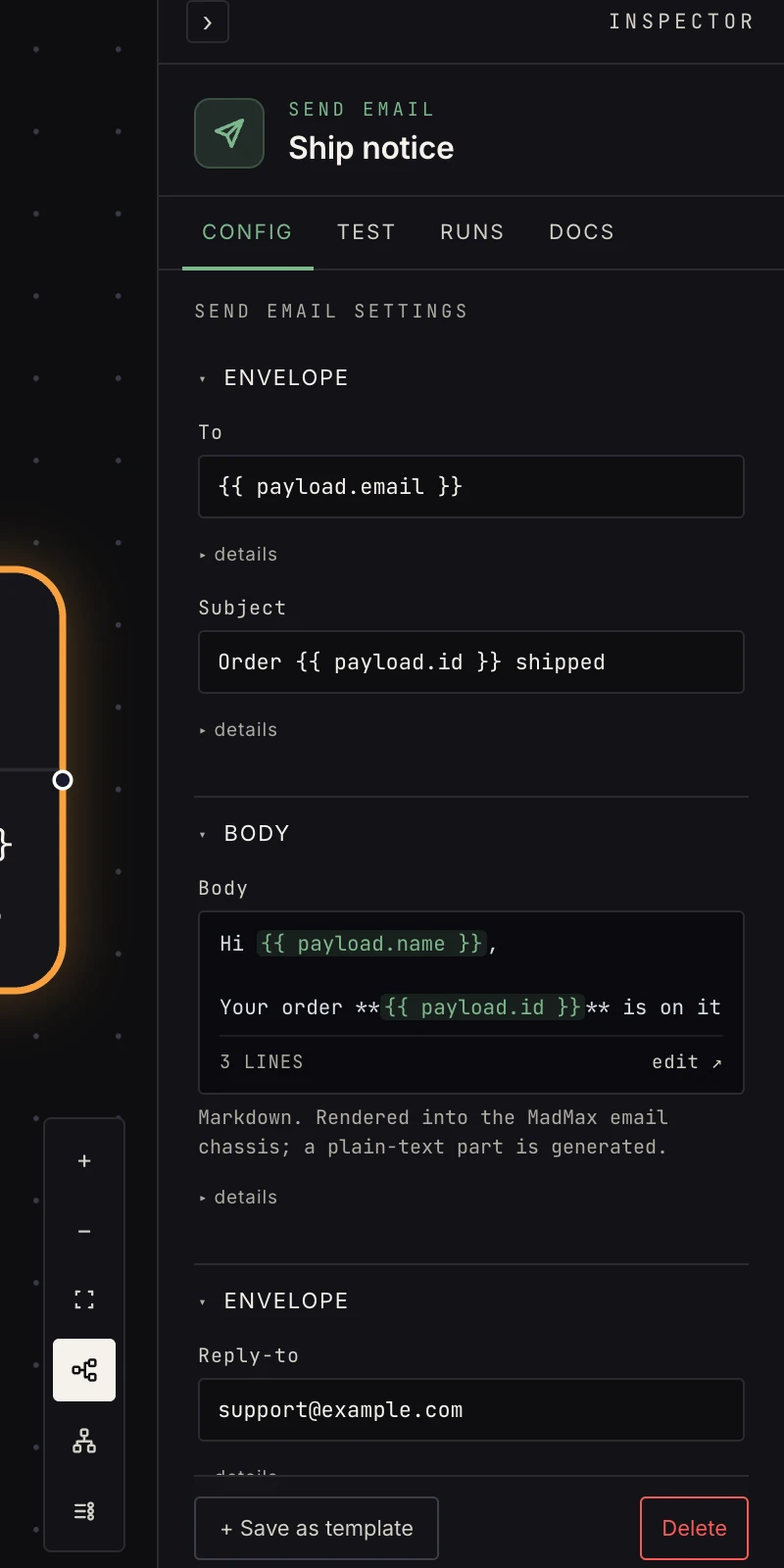 Recipients, subject, markdown body, all template-rendered.
- To: up to 5 addresses, separated by commas, semicolons, or
newlines, template-rendered:
{{ payload.email }}, ops@example.com. Each rendered address must look like an address, or the step fails before sending. - Subject: template-rendered. Required.
- Body: markdown, so links, bold, lists, tables, code blocks all render; a plain-text part is generated automatically. Template-rendered. Required.
- Reply-to: optional but set it: replies otherwise go to the platform sender. Validated like a recipient.
- Button label and Button URL: optional; together they add
a call-to-action button under the body. The URL must start with
http://orhttps://, and setting one without the other is an error rather than a half-rendered button.
Every field accepts {{ payload.x }} and
{{ steps.<id>.output.x }}.
Output
{ "ok": true, "id": "<message id>", "to": ["ops@example.com"], "subject": "…" }
{{ payload.to }} is the list of rendered recipients and
{{ payload.subject }} the subject as sent. The step's only out
port is ok; on failure the error payload carries ok: false,
to, and an error string.
Verification
The verify kind is write_preview: the verification run renders
the exact email against the real upstream sample, including the
chassis HTML, and sends nothing. What you see in the preview is
byte-for-byte what a live run would send.
Patterns
- Digest: gather → aggregate → summarize → one email.
- Notify + act: the button URL deep-links to the thing needing attention.
- Reply to the sender: after an email trigger,
{{ payload.from }}as the recipient andRe: {{ payload.subject }}as the subject. - For approve/reject decisions, use approval's built-in email instead of building your own.
Gotchas
- The from-line is fixed (platform sender), so sending from your own domain isn't this step; that's what per-workspace daily caps and the 5-recipient limit protect. The cap is 100 sends a day by default; over it, the step fails with the time until reset.
- Template the recipient only from fields you trust, because a malformed
upstream
emailfield fails the send. - Six addresses in To is an error, not five sends and a warning. For a list, loop over it.
- The footer shows the workspace and workflow names and a short run id, so a test send is recognisable as one.
Related
- Email, the guide to both directions.
- Email trigger for inbound.
- Approval for decision emails with signed links.