Form
Define fields by label and type, share the URL, and each submission starts the workflow with answers keyed by field label. Intake routing and lead scoring.
A hosted form MadMax serves for you: define the fields, share the URL, each submission fires the workflow.
When it runs
On each submission of the form (URL in the Inspector, of the form
/forms/<id>). Active workflows only, plus the listening window a
Run opens while you build. There is no login and no token: the
unguessable id is the access control. While the workflow is
inactive the page says the form isn't available yet and suggests
activating it.
The page is a dark card with the title, the optional description, one input per field, and a Submit button. Required fields are marked and enforced by the browser. After submitting, the visitor sees "Thanks! Your response has been recorded."
Config
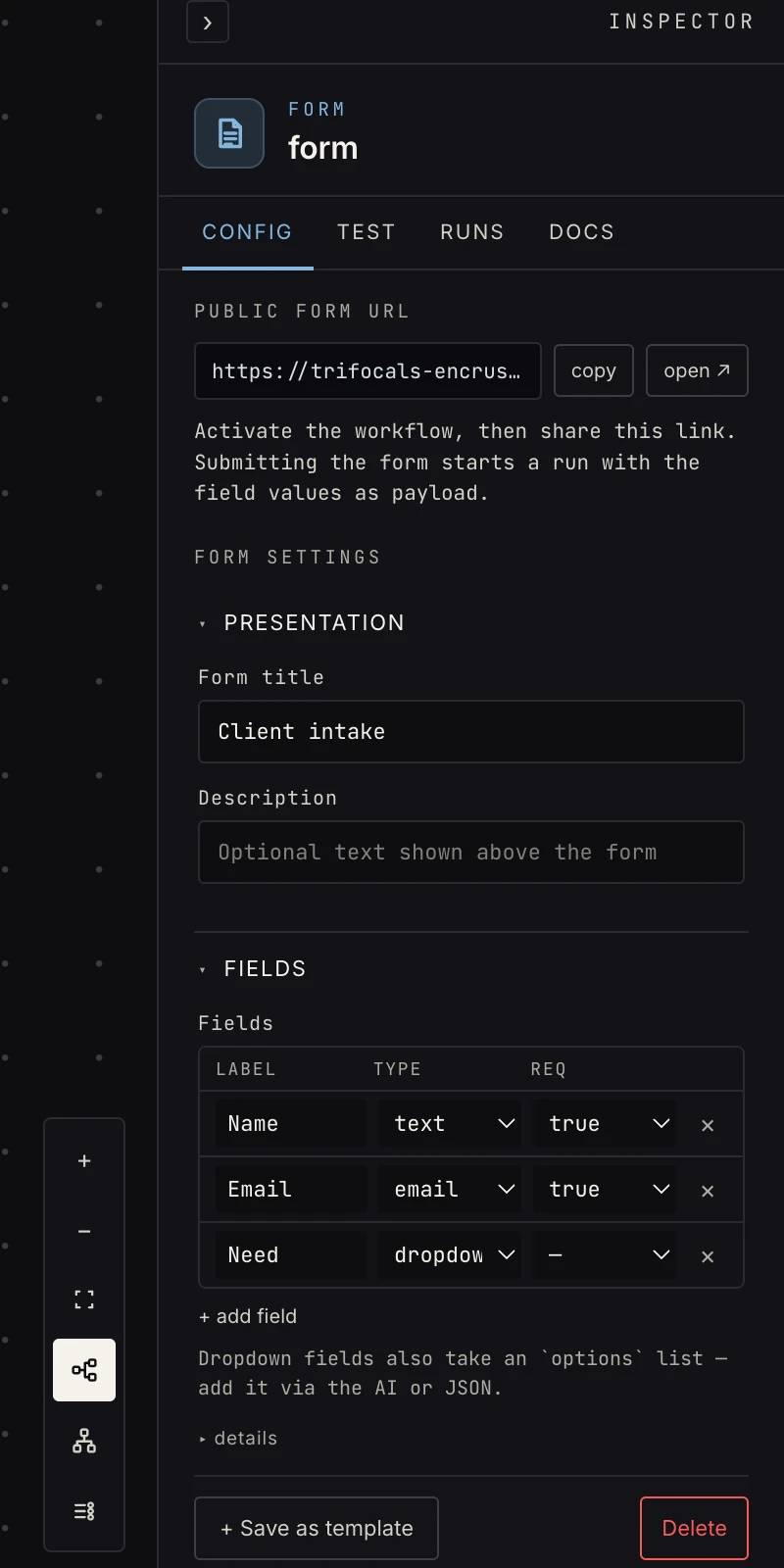 Title plus a field list: label, type, required.
- Form title: the form's heading.
- Description: optional text shown above the fields.
- Fields: one row per field with a label, a type, and
required. Types:
text,textarea,email,number,dropdown,date,file. A dropdown also takes anoptionslist of strings, rendered as a select. The hosted form posts text values only; for real file uploads use the file upload trigger.
Output
The answers, keyed by field label, verbatim:
{ "Name": "Dana", "Email": "dana@bigcorp.com", "Need": "sales" }
Labels are the keys, capitalization and spaces included:
{{ payload.Email }}, not {{ payload.email }}. Every value is a
string, because that is what an HTML form posts: a number field
arrives as "42", a date as "2026-01-15". Cast in a
code step if arithmetic follows.
Short snake_case labels (what_they_need) make the nicest
references ({{ payload.what_they_need }}); prose labels still
work but need the exact text.
Verification
Because the shape is declared by the fields themselves, the
platform documents it: with at least one labeled field the verify
kind is documented, a sample is built from the labels (an email
field becomes sample@example.com, a dropdown its first option),
and downstream steps verify against that without a human
submission. A real submission replaces the sample once one
arrives. A form with no labeled field yet keeps the capture_real
gate and the walk opens the form for you.
The build-time linter reads the labels too, so a reference to a key no field produces is flagged before the first run.
Patterns
- Intake router: dropdown field → switch on the answer → different channels per choice.
- Lead scoring: form → AI score → hot-lead alert + record.
- Internal tools: a form is the fastest UI you'll ever ship. Pair it with approval for requests that need a sign-off.
- Form → store: every submission becomes a row via store upsert, so the workspace keeps the history without a spreadsheet.
Gotchas
- Renaming a field's label renames the payload key, so downstream refs need the same edit (the linter will point at them).
- Verification is documented from the labels, so it passes without a submission; it's still worth submitting the form once to see real values flow.
- The form reads its fields from the active snapshot once the workflow is active. Adding a field to the canvas changes the hosted page only after you activate again.
- The page is public to anyone with the link.
Related
- File upload for files.
- Switch for routing on a dropdown answer.
- Verification for what
documentedmeans.