Respond to webhook
Answer the webhook caller mid-run with a status, headers, and a body shaped from the payload while the workflow keeps running. Needs respond-step mode.
Send a custom HTTP response back to whoever called your webhook, with a status, headers, and a body you shape, while the workflow keeps running downstream.
Only meaningful when the webhook trigger's response mode is respond step: in the other modes the trigger already answered (202 immediately) and this step's output is ignored.
What it does
In respond-step mode the webhook caller's connection stays open while a responder polls the run. The poll interval and the maximum wait are settings on the webhook trigger: by default it checks every second and gives up after 30 seconds (the ceiling is 60 seconds, since most HTTP infrastructure cuts connections around there). The moment this step completes, its output is sent back as the HTTP response. Three other endings are possible:
- the run reaches the end without this step ever completing (a branch skipped it): the caller gets a 500;
- the run fails before it: 500 with the failure;
- the timeout passes first: 504. The run keeps going to completion either way, so the caller's timeout never loses work.
If more than one respond step completes in the same run, the first one the responder finds wins, so design the graph so exactly one is reachable per run.
Config
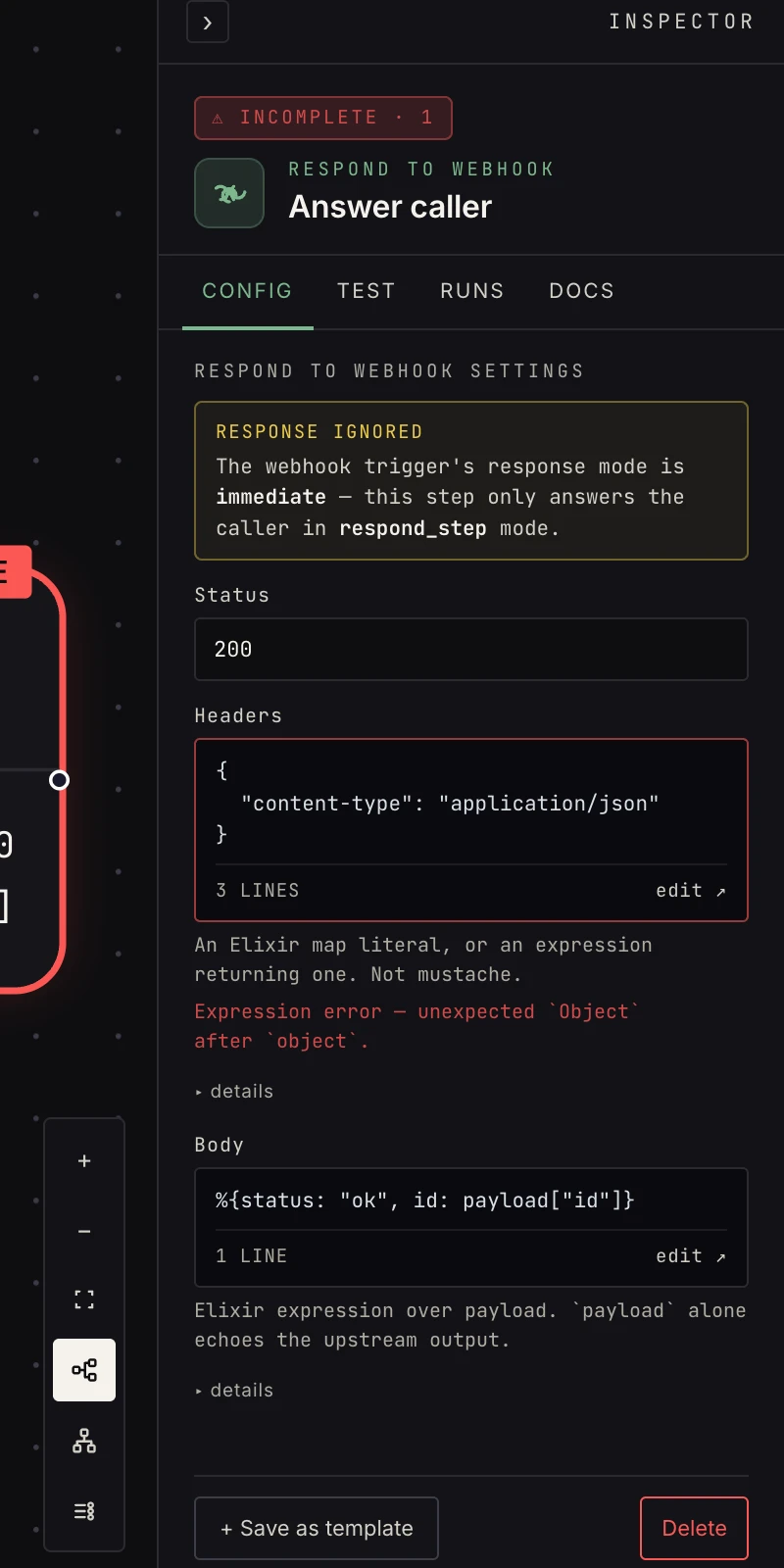 Status, headers, and the body expression.
- Status: 100 to 599, default 200. Anything else fails the step.
- Headers: a map literal
(
%{"content-type" => "application/json"}) or an expression returning one. Default: JSON content type. - Body: an expression over
payload(not{{ }}templating).payloadis the immediate upstream step's output as a string-keyed map.payloadalone echoes it;%{status: "ok", id: payload["id"]}shapes a custom JSON response. The default ispayload.
An expression that raises fails the step with the error message, so a typo surfaces as a red step rather than a silent empty response.
Output
The step's output is the response itself, which is also what the caller receives:
{
  "status": 200,
  "headers": { "content-type": "application/json" },
  "body": { "status": "ok", "id": "ord_123" }
}
Downstream steps can read {{ payload.body.id }} from it, though
the usual move is to branch off the step before the respond and
continue the heavy work from there.
Patterns
- Synchronous API: webhook → process → respond with the result: your workflow is the endpoint. Keep the path short so it fits inside the trigger's timeout.
- Fast ack, custom shape: respond early with
%{received: true}, keep the heavy work running after. The caller is answered in under a second and the run continues on its own job. - Validate then answer: an if checks required fields; the false branch responds with status 422 and an error map, the true branch does the work and responds 200. Each branch needs its own respond step only if both can be reached in one run; design so exactly one is.
Gotchas
- The caller waits until this step runs, so keep the path from trigger to respond short, and put slow work after the response.
- Headers and body are expressions, so
{{ payload.x }}mustache syntax won't work here (this is the one Act step where that's true). Reach into the payload withpayload["x"]. payloadis the immediate upstream output. To answer with a field from an earlier step, carry it forward with set fields first.- With the trigger in
immediateorlast_stepmode the step still runs and still produces its map, but nothing is sent.
Related
- Webhook for the three response modes.
- Webhooks, the guide to inbound HTTP.
- Set fields for shaping what the response can see.