Getting started
What MadMax is and how to ship a first workflow in minutes: describe it to the AI or build by hand, activate a snapshot, and find runs and settings.
MadMax is a workflow automation platform: you draw a directed graph of steps on a canvas, and the server runs it when its trigger fires: a webhook, a schedule, an email, a form submission, or you clicking run. The AI in the editor (Max) can do the drawing for you, and it tests every step on real data before anything goes live.
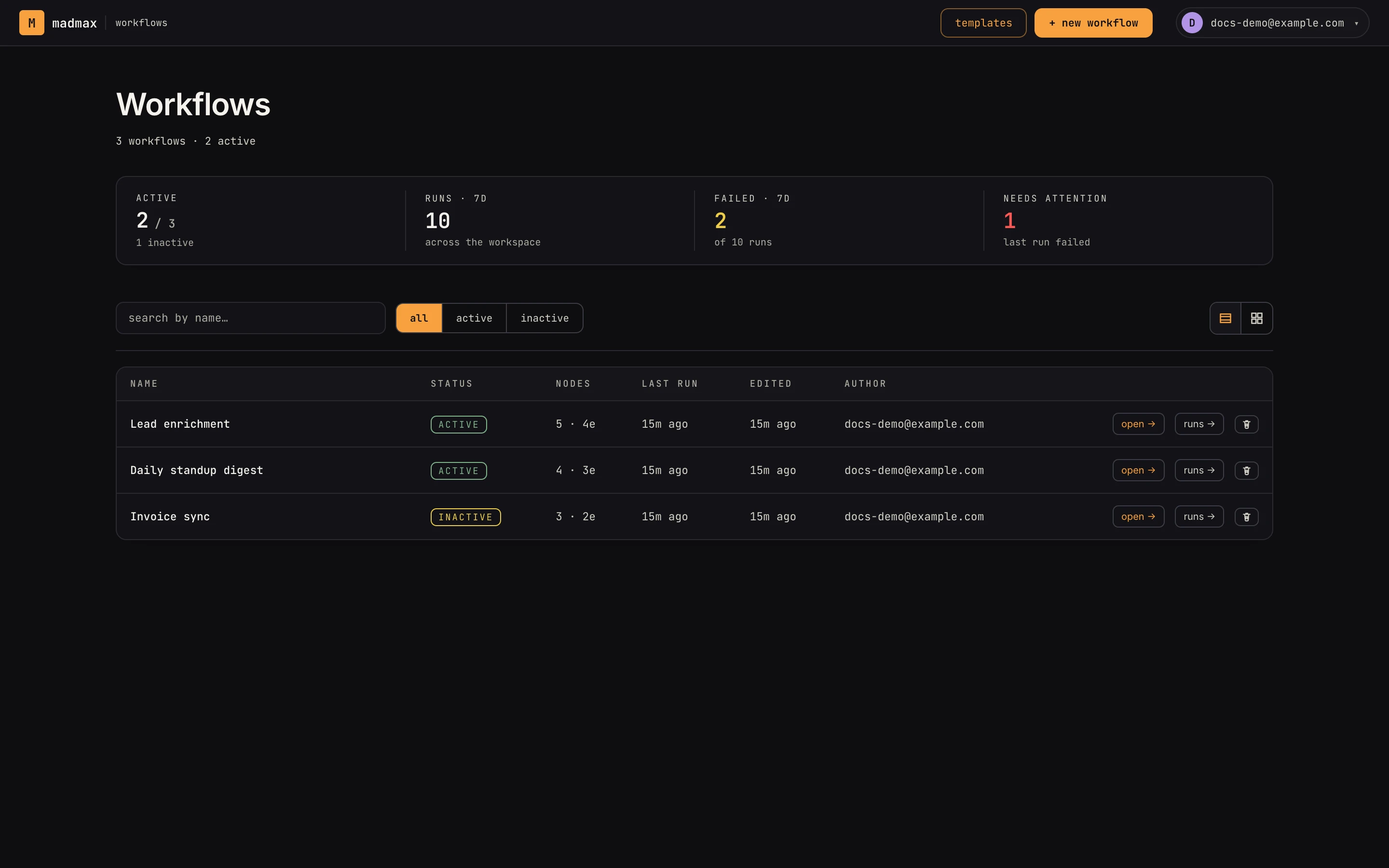 The workflows index: the health strip tracks active workflows, 7-day runs and failures, and anything needing attention.
Your first workflow
- From Workflows, click New workflow. The modal has two starts. Pick a card under Start from an outcome and the canvas opens with a plan already proposed and Max talking. Or scroll to "or start from scratch", give it a name (notes are optional) and create it. Either way you land on the canvas.
- Pick how you want to build:
- Describe it: the chat sits in the left column with the prompt "describe what you want, or ask about this workflow". Type the outcome ("every morning, fetch the top posts from r/SaaS and Slack me a summary"). In Build mode Max proposes a plan, drops the steps on the canvas, wires them, and runs each one against real data as it goes. The Plan tab shows each step's intent and its verification state.
- Build by hand: open Blocks, drag a trigger and the steps you need onto the canvas, connect them port to port, and fill in each step's fields in the Inspector on the right. The Inspector flags required fields you haven't set yet.
- Test on real data. Click a step and use the Inspector's Test tab: Run step executes it against the upstream sample and pins the result for the next step. For a webhook, email, form or upload trigger, press the topbar run button: the trigger starts listening, you send one real request, email or submission, and that delivery both runs the draft and becomes the trigger's sample. Sends preview instead of sending while you test.
- Flip the topbar switch from off to live. That freezes the current canvas into a snapshot and starts firing triggers against it. Activation refuses if a step is incomplete, a reference points at a step that isn't upstream, or there is no trigger at all; it names the problem so you can fix it.
- Find the run. The workflow menu's Run history (also reachable
from the workflow's row on the index) lists runs newest-first
with status chips (
running,waiting,completed,failed,cancelled). Open one for the step timeline: each step's input, output, timing and any error. A failed step carries a Repair with AI link that reopens the canvas with the failure loaded.
Saving and versions
There is no save button. Every canvas edit autosaves; live pins an immutable snapshot that triggers fire against, so you can keep editing the live canvas without touching what's running. While edits are pending the topbar shows Publish edits with a count; clicking it cuts a new snapshot. Turn the switch off any time to stop triggers; the snapshot survives for audit and the clock icon opens Snapshot history so you can load any earlier version back onto the canvas.
Where things live
| Surface | What it's for |
|---|---|
| Workflows | the index: health strip, search, list/grid, folders, notes |
| Canvas | build + edit one workflow, chat with Max |
| Runs | execution history per workflow, step-by-step results |
| Settings | profile, workspaces, billing, connectors, developer tokens, messaging, data |
Two things worth knowing on day one. Connected accounts (Slack, Gmail, GitHub and the rest) live in Settings → connectors and are shared by every workflow in the workspace, so connect once. And the chat has an Ask mode that answers questions about the workflow without changing anything, which is the safe way to explore a workflow someone else built.
Related
- Core concepts: workflows, steps, payloads, snapshots
- Canvas tour: the four regions of the editor
- Building with AI and building by hand
- Testing: pins, capture, and previewed sends
- Triggers and activation
- Runs: statuses and the run detail
- Connections: connecting your accounts