Extract
Declare fields and the AI pulls them from upstream text or an uploaded PDF or image with vision. Per-field confidences, missing required fields, auto-save.
Declare the fields you want (name, type, required) and the AI pulls them out of upstream text or an uploaded document (PDF or image, read with AI vision). No prompt writing: the fields are the contract.
What it does
Extract is the AI Agent step with its Task set to extract.
It builds a strict schema from your rows (the model may only return
names you declared), sends the document bytes as a vision part or
the upstream text as plain text, and folds the answer into a
name-keyed envelope. The system prompt tells the model to extract
only what is clearly present and never guess, so a value the
document doesn't contain is simply absent from the result.
Document extractions auto-save their result: fields, confidences, the source document and the run are persisted as an extraction result row, no separate save step needed. The save is best-effort; if it fails the step still succeeds and the run continues.
Config
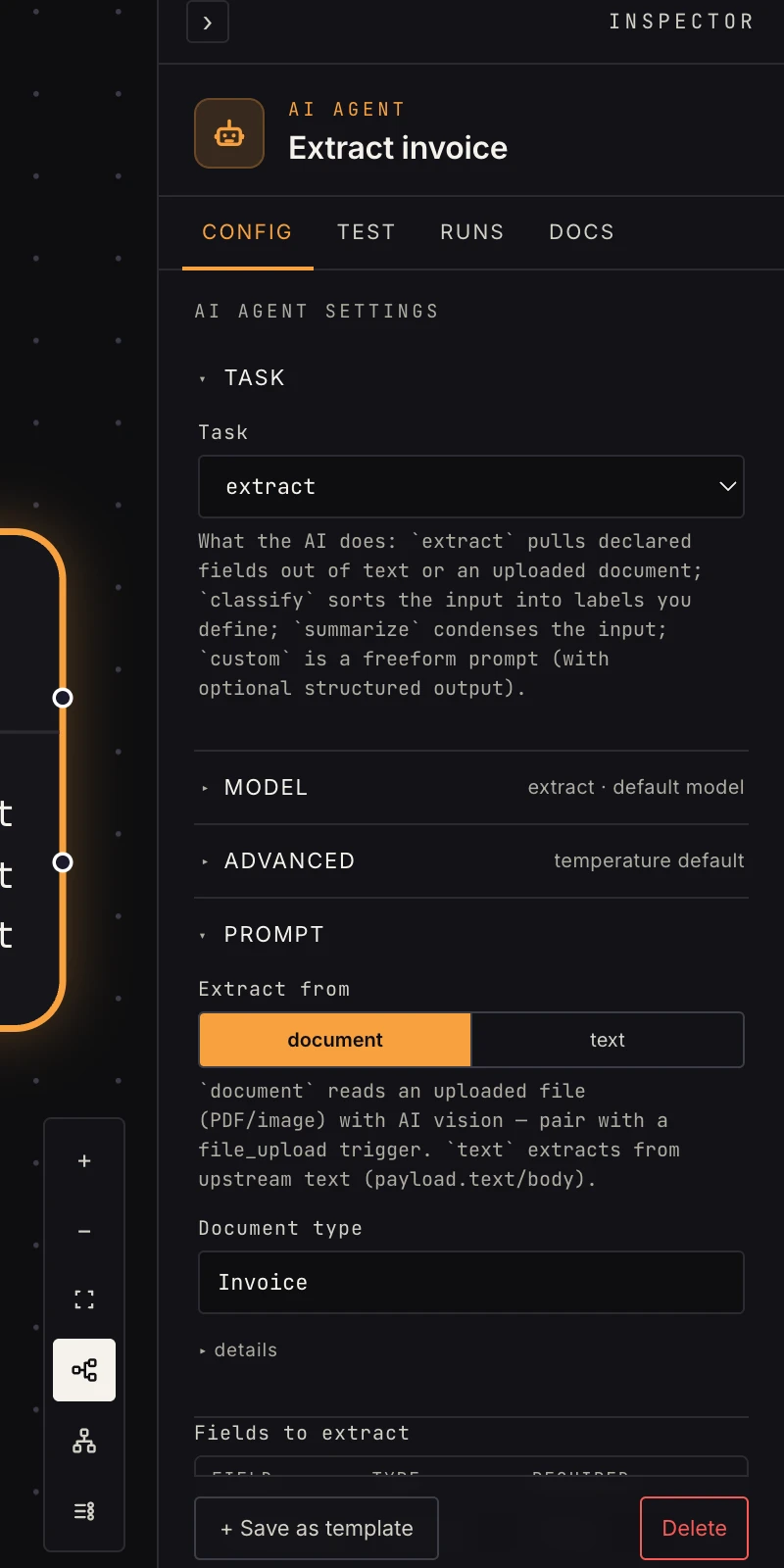 A fields table is the whole schema: one row per value to pull out.
- Extract from:
document(the default) reads an uploaded file with AI vision; pair with a file upload trigger.textextracts from upstream text, read frompayload.text,payload.body, or a loop item'stext; the step fails if none of those exist. - Fields to extract (required): one row per field with a Field
name (
borrower_name), a Type (string,number,date,currency,boolean; anything else falls back tostring), and Required (true,yesor1count as true). Rows without a name are dropped; an empty table fails the step. - Document type: optional label ("Invoice") stored on the auto-saved result. Document mode only.
- Document (expression): optional expression such as
payload["files"]naming which uploaded file to read. Leave it blank and the step auto-detects: the loop item, afileslist on the payload, or the file upload step's own output. Document mode only. - Provider and Model: blank runs on the platform's vision model. Bind an AI connection to use your own key.
- On failure (Advanced):
fail(default),retry,continue, orretry_then_continue.
Output
Name-keyed fields, each with its value and provenance:
{
  "fields": {
    "invoice_number": {
      "value": "INV-2041",
      "raw_value": "INV-2041",
      "confidence": 0.98,
      "page_number": 1,
      "source": "openrouter:openai/gpt-5.6-luna"
    },
    "total": {
      "value": "1250.00",
      "raw_value": "$1,250.00",
      "confidence": 0.95,
      "page_number": 2,
      "source": "openrouter:openai/gpt-5.6-luna"
    }
  },
  "missing_required": [],
  "document": {
    "key": "uploads/…/invoice.pdf",
    "document_id": "…",
    "filename": "invoice.pdf",
    "content_type": "application/pdf",
    "doc_type": "Invoice"
  },
  "extraction_result_id": "…"
}
Downstream, reference {{ payload.fields.total.value }}. Every
value is a string: the Type column is a normalization hint
to the model ($1,250.00 comes back as 1250.00), and
raw_value keeps the verbatim source text. Cast in a
code step before doing arithmetic.
confidence is the model's 0 to 1 estimate, page_number is
1-indexed, and source is the model that read it.
Any required field the document doesn't contain lands in
missing_required. Branch on it with an if to
route incomplete documents to a human. document echoes the file
descriptor (an empty map for text source), and
extraction_result_id is present when the auto-save landed.
Patterns
- Invoice intake: file upload → extract (number, total, due
date) → branch on
missing_required→ save to a store. - Email parsing: email trigger → extract from text (order id, customer, issue) → look up the order.
- Several attachments: a loop over
payload.fileswith extract inside reads one file per iteration.
Gotchas
- Fields the model can't find are missing from
fields, notnull. Reference optional fields defensively or checkmissing_requiredfor the required ones. - Extraction confidence is per-field: gate high-stakes automation
on it (
{{ payload.fields.total.confidence }}) rather than trusting every read. - Text source never auto-saves; there is no document to anchor the row to.
- The build-time shape check knows your field names, so a reference to a field you didn't declare is flagged before you run.
Related
- File upload: the trigger that supplies the document.
- Classify: pick a document type first.
- Data stores: where extracted records live.
- AI settings & models: the vision model and BYO providers.